
Contains affiliate links (#Ad).
We’ve picked the best budget monitors UK shoppers can buy today, from a £42.75 AOC 24-inch screen to a sharp 27-inch QHD Dell for under £140. Prices were checked on Amazon UK on 12 November 2026 and may change.
A second screen is one of the cheapest upgrades for working from home or studying: you can keep email on one side and a document on the other, and sit further from a small laptop display. We only kept monitors from well-known brands that were in stock with a clear current price.
In this guide
Quick picks: the best budget monitors UK at a glance
| Best for | Product | Amazon UK price* | Rating on Amazon | Shop |
|---|---|---|---|---|
| Cheapest 24-inch | AOC 24B3HA2 (24in) | £42.75 | 4.6/5 (1,654 ratings) | Amazon · eBay |
| Cheapest 27-inch | AOC 27B3HA2 (27in) | £56.00 | 4.6/5 (1,654 ratings) | Amazon · eBay |
| Best for casual gaming | ASUS VY279HGR | £84.00 | 4.4/5 (1,316 ratings) | Amazon · eBay |
| Best for eye comfort | Dell SE2425HM | £94.00 | 4.7/5 (706 ratings) | Amazon · eBay |
| Best ergonomic stand | Samsung S24D400 | £94.89 | 4.6/5 (164 ratings) | Amazon · eBay |
| Best sharp 27-inch | Dell SE2726D (QHD) | £134.00 | 4.6/5 (244 ratings) | Amazon · eBay |
The list runs from cheapest to most expensive. Ratings are Amazon’s own customer scores on the day we checked; the two AOC models share one listing family, which is why they show the same rating count.
Our reviews of the best budget monitors UK
Here is a closer look at each pick, with the price we saw on Amazon UK on 12 November 2026, who sells it, the key specs from the listing and who it suits.
AOC 24B3HA2 24-inch Full HD IPS Monitor, 120Hz

The cheapest monitor on our list cost £42.75 when we checked, sold and dispatched by Amazon. It is a 24-inch Full HD (1920 x 1080) IPS screen with a 120Hz refresh rate, which makes scrolling and mouse movement look smoother than an older 60Hz display.
AOC lists built-in speakers and a slim three-sided border. Connections are basic, with HDMI 1.4 and VGA, and the stand only tilts, so you may want a monitor riser. As a first second screen for a laptop, it is one of the best budget monitors UK buyers can get.
AOC 27B3HA2 27-inch Full HD IPS Monitor, 100Hz

If you want a bigger screen for very little money, the 27-inch AOC cost £56.00, sold by Amazon. It has a matte IPS panel, a 100Hz refresh rate, Flicker Free and Low Blue Light modes, two 2W speakers and a headphone output.
The listing quotes 250 nits brightness, a 1,300:1 contrast ratio, one HDMI 1.4 and one VGA port, VESA 100 x 100 mounting and a three-year manufacturer’s warranty. Full HD stretched across 27 inches looks a little softer up close, so this suits films, spreadsheets at a distance and general use more than fine photo editing.
ASUS VY279HGR 27-inch Eye Care Monitor, 120Hz

The ASUS cost £84.00 when we checked, sold by Realtime Distribution and dispatched by Amazon. It is a 27-inch Full HD IPS monitor with a 120Hz overclocked refresh rate, 1ms MPRT and Adaptive Sync, so it is a good fit for casual gaming on a PC or console as well as work.
ASUS also lists an antibacterial treatment on the bezel and buttons and its Eye Care features. As with the AOC 27, the resolution is Full HD, so text is less crisp than on the QHD Dell further down.
Dell SE2425HM 24-inch Full HD Monitor, 100Hz

Dell’s 24-inch SE2425HM cost £94.00, sold by DD Store LTD and dispatched by Amazon. It is a 23.8-inch Full HD IPS panel at 100Hz, with TÜV Rheinland 3-star eye comfort certification and Dell’s ComfortView Plus low blue light mode built in.
It has an integrated power supply, cable management, HDMI and VGA inputs and VESA 100 x 100 mounting, and the listing mentions a three-year warranty. It is a tidy, dependable office monitor rather than a gaming screen.
Samsung S40D (LS24D400GAUXXU) 24-inch IPS Monitor with Height-Adjustable Stand
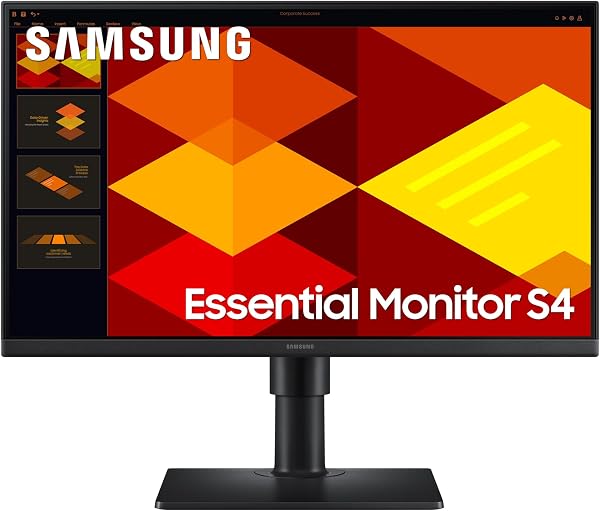
The Samsung cost £94.89, sold by Amazon. Its biggest advantage over most budget monitors is the stand: it adjusts for height and can pivot 90 degrees into portrait, which is useful for long documents or code.
It is a 24-inch Full HD IPS screen with a 100Hz refresh rate, Eye Saver Mode and reduced flicker, and the title lists DisplayPort, HDMI and USB. If you spend all day at a desk, a height-adjustable stand is worth paying a little extra for.
Dell SE2726D 27-inch QHD Monitor, 144Hz

Our pick for a sharper picture cost £134.00, sold by Amazon. It is a 27-inch QHD (2560 x 1440) IPS monitor, which Dell says gives 1.77 times the detail of Full HD, with a 144Hz refresh rate, 1ms MPRT and AMD FreeSync.
Dell quotes a 1,500:1 contrast ratio and TÜV Rheinland 3-star eye comfort certification. More pixels means crisper text and room for two windows side by side, which makes this the best all-round choice among the best budget monitors UK shops sell if you can stretch your budget.
How we chose the best budget monitors UK
We focused on 24 and 27-inch screens from established brands with at least 100Hz refresh rates and IPS panels, which give better colours and viewing angles than cheaper VA or TN screens. We opened every product page on Amazon UK on 12 November 2026 and dropped anything out of stock or without a clear price. Specs come from the listings; we have not lab-tested these monitors.
Which of the best budget monitors UK buyers can get suits you?
- A cheap second screen for a laptop: the AOC 24B3HA2.
- The biggest screen for the money: the AOC 27B3HA2.
- Work by day, games by night: the ASUS VY279HGR.
- A tidy office set-up: the Dell SE2425HM.
- Long days at a desk: the Samsung S24D400 with its height-adjustable stand.
- Sharper text and more space: the Dell SE2726D QHD.
Buying guide: what to check before you buy
Here is what matters most when comparing the best budget monitors UK retailers list.
Size and resolution
At 24 inches, Full HD looks sharp at normal desk distance. At 27 inches, Full HD is fine for films and general use, but QHD (2560 x 1440) makes text noticeably crisper and gives you more workspace.
Refresh rate
Most budget monitors now run at 100Hz or 120Hz rather than 60Hz. That makes scrolling feel smoother even if you never play games. For fast gaming, 144Hz and Adaptive Sync or FreeSync help reduce tearing.
Ports and cables
Check your laptop’s outputs. Many budget monitors only have HDMI and VGA, so a laptop with only USB-C will need a USB-C to HDMI cable or adapter. Monitors usually come with a cable, but not always the one you need.
Stand and mounting
Most cheap monitors only tilt. If yours does not adjust for height, a monitor riser or a VESA arm can bring the top of the screen to eye level.
Setting up your screen safely
If you work from home, it is worth setting up the monitor properly. The top of the screen should be roughly at eye level, about an arm’s length away, with the screen tilted slightly back to reduce glare. Take regular short breaks from the screen. For more detail, read the HSE’s guidance on working with display screen equipment.
Our guide to the best home office accessories UK covers monitor stands, keyboards and webcams that pair well with any of these screens.
Black Friday tips for monitor deals
Monitors are among the most heavily promoted items around Black Friday, but prices on budget models move by only a few pounds. Compare the size, resolution, refresh rate and stand rather than the discount badge, and check who sells each one. The best budget monitors UK sellers offer from Amazon or the brand’s own store are the easiest to return. You can also compare the same model on eBay UK.
Best budget monitors UK: frequently asked questions
Is a 24-inch or 27-inch monitor better for working from home?
A 24-inch screen suits a small desk and looks sharp at Full HD. A 27-inch screen gives more space, and is best paired with QHD resolution if you work with lots of text.
Can I connect a budget monitor to a MacBook?
Yes, but most MacBooks only have USB-C or Thunderbolt ports, and these monitors use HDMI, VGA or DisplayPort. You will need a USB-C to HDMI cable or a hub.
Do budget monitors have speakers?
Some do. The two AOC models list built-in speakers, but they are basic, so use headphones or separate speakers for music and calls.
Is 100Hz worth it for office work?
Yes. A 100Hz or 120Hz screen makes scrolling and moving windows look smoother than 60Hz, and budget models now include it at little or no extra cost.
Can I mount these monitors on an arm?
The AOC 27B3HA2 and Dell SE2425HM list VESA 100 x 100 mounting. Check the listing for any other model before buying an arm.
Our verdict on the best budget monitors UK
For most home offices, the Samsung S24D400 is the most comfortable pick thanks to its height-adjustable stand, while the Dell SE2726D is the one to buy if you want a sharp 27-inch screen. On a tight budget, the AOC 24B3HA2 does the basics well for under £45. Prices on the best budget monitors UK stores sell change often near Black Friday, so check before you buy.
Related guides
You may also find these guides useful:
- best home office accessories UK
- best budget laptops for students
- gaming headsets and mice under £50
- power banks and fast chargers
See more in our guide hubs: best tech gadgets UK and Black Friday deals UK.
#Ad – This post contains affiliate links. We may earn a commission if you buy through them, at no extra cost to you. As an Amazon Associate, Smart Pocket Deals earns from qualifying purchases.
Learn how we pick deals.